Layout
The three width tiers, where the pane and band appear in each, and what each tab shows.
Three tiers
glowup chooses a layout by terminal width. In every tier it draws beside or above Claude Code's transcript and prompt without moving them.
| Tier | When | What you see |
|---|---|---|
| Wide | The glowup pane is docked beside the transcript | The full pane, with Clawd at the bottom. The band is hidden because the pane already shows the same information. |
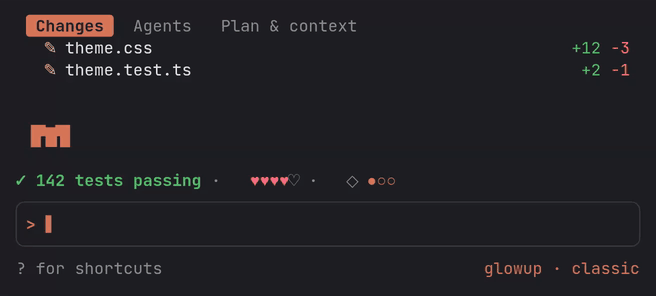
| Medium | 80 columns or more, and the pane is not docked | The band above the prompt. The pane opens as a drawer when you ask for it. |
| Compact | Under 80 columns | A shortened band. The drawer is a tab strip and at most six rows. |
When the pane docks
In fullscreen, glowup asks Claude Code once to open its pane, but Claude Code only docks a pane the user did not open at 144 columns or more. After you have opened the pane yourself, it docks from 110 columns. Below that, the band is shown instead.
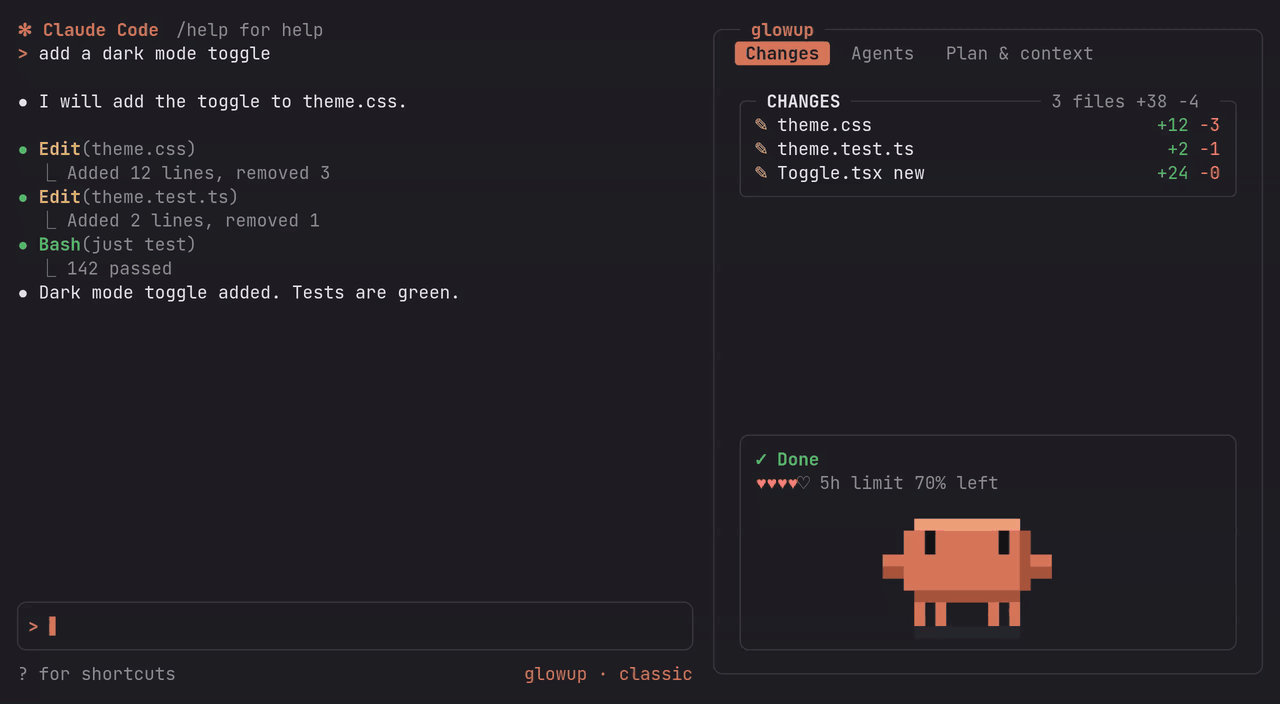
Clawd only ever appears in the pane; see Pets.
The drawer
Below the docking width, /glowup pane opens the pane as a drawer above the prompt, and Esc or the same command closes it. When the drawer is narrower than 80 columns, each tab uses its compact form.
The band
The band is one line above the prompt. It appears while Claude works and folds away 1.5 seconds after the turn ends, unless background subagents are still running, in which case it stays with the action shown as delegating. At the end of a turn the action reads ✓ Done, ■ Interrupted if you interrupted it, or ✗ Stopped after an error or a refusal.
From left to right it shows:
- The current action with its glyph and color, for example
✎ Editing auth.ts. Failures show in thefailcolor and passes in thepasscolor. - The number of running subagents, for example
◆ 2 subagents. - Five hearts for the context you have left, each worth 20% of the window.
- Plan progress as pips,
●●○○, when Claude has a task list. - With a pack that turns them on, an HP bar in place of the hearts and a
COMBO x3tag. See Extras.
When the line is too long, the action text is shortened first. If the rest of the line would leave the action fewer than 8 columns, the band drops everything but the action. The band is also hidden while Claude Code's feedback survey is open and while you view a subagent's transcript.
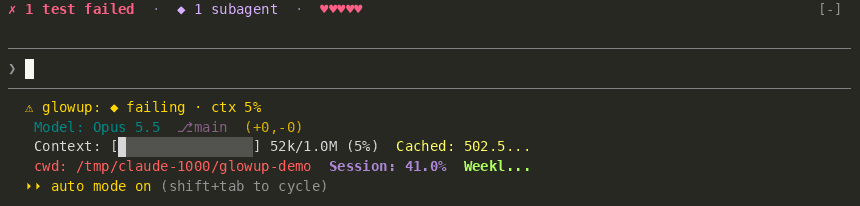
Pick which parts show and in what order with /glowup setup band (see setup). combo always sits right after the activity label.
The tabs
The pane has three tabs, selected with their number key or by clicking. In the docked pane each tab is a box in the pack's border style, with the section name and its counts in the top edge; the compact drawer draws no boxes.
Under the tabs in the wide pane, a status box shows the current action, the running subagents and a row of hearts. These hearts show account usage: whichever of the 5-hour and weekly limits has less left, for example ♥♥♡♡♡ weekly limit 38% left. On an API key, which has no such limits, the row shows the session's spend instead, such as $4.20 spent this session. Until the first usage reading arrives, the hearts show context.
Hide or reorder tabs with /glowup setup tabs; their number keys follow the order shown.
Changes
Every file that changed during the session, or Nothing changed yet.
- Each file shows
+added −removed, and new files are markednew. - The box's top edge shows the number of edited files and the total lines added and removed.
- In a git repository the counts come from
git diff --numstatagainst a snapshot taken at session start, so files you had already modified before the session are not listed, while files changed by shell commands during it are. New untracked files, and sessions outside git, use the line counts from the edit itself. - glowup runs git without taking locks, so it does not hold up Claude's own git commands.
- The compact form lists edited files only.
Agents
Each subagent started this session, or No subagents this session. The tab keeps updating while background subagents run after the main turn ends.
- Name, elapsed time, token count, and a spinner while it runs or a check mark when it is done.
- Its task description.
- While it runs, the tool it is using now.
- With reduced motion on, the spinner is a still mark.
- The compact form is one line per subagent.
Plan & context
The tab has two boxes, PLAN and CONTEXT, one blank row apart.
PLANis Claude's task list.◉is in progress (bold, with its active wording when the task has one),○is next,✓is done. In progress comes first, then next, then the last three done, dimmed, with+N more donefor the rest. The top edge shows done over total.- The list is Claude Code's saved one, read from
tasks/<list>/*.jsonunder your config directory when the session starts and again after eachTaskCreateorTaskUpdateClaude makes.<list>isCLAUDE_CODE_TASK_LIST_IDwhen that is set, otherwise the working directory with every character outside letters and digits turned into-and the leading-dropped (/home/you/Projectsishome-you-Projects). Deleted and unreadable tasks are skipped. Subagent task calls do not count. ATodoWritelist still shows too. CONTEXThas one stacked bar: each part of the context that uses tokens is its own colored segment, biggest first, and free space is a faint░track (·when the theme gives no usable colors). Segment colors come from your theme'sread,agent,shell,editandaccentcolors, so they follow the pack. If the theme gives no usable colors, the segments use the block shades█▓▒░instead. The top edge shows the percent and tokens, such as62% · 124k / 200k.- Under the bar, a legend names each part with its share (
● messages 31%) and wraps onto more lines when the pane is narrow. Up to five parts get their own segment and the rest join asother. - A
┊on the bar marks where auto-compact runs. It is absent when auto-compact is off. - Below the legend, a two-row braille chart of the context percent, one sample per finished turn. A compaction shows as a drop. The chart's top, printed at the right end of its first row, is the auto-compact point once the session is within half of it, and a dashed rule marks that point. Until then the top sits a little above the session's peak, so a small session on a large window still has a visible shape. Each turn gets a full cell until the chart is full, then two turns share a cell. The chart shows once there is a sample.
- Under the chart, how fast the context grows and when auto-compact will run, such as
+7k/turn · auto-compact in ~6 turns. The growth is averaged over the last six turns since the last compaction. The line saysauto-compact offwhen it is off. - Next, up to three of the heaviest sources you can trim, each with its tokens: an MCP server's loaded tool schemas (
mcp linear 38 tools 14k), a memory file such as aCLAUDE.md, the skill listing, or the custom agent listing. - The last line shows the prompt cache's share of the last request's input, the session's peak, and the number of compactions, such as
cache hit 92% · peak 81% · compacted 1×. - From 70% used, a warning line names the biggest part.
- The compact form is the checklist and one line with the stacked bar, its auto-compact mark, and the percent.
- Without a task list,
PLANsaysNo task list yet.
A mod cannot hide Claude Code's own task list, so the plan shows in both places.
The tabs do not respond to selection yet; opening a file's diff or a subagent's tool calls is on the roadmap.